
Daisypath Anniversary tickers

Monday, June 27, 2016


As ever there are a few other considerations for using a Range Extender, such as placement. The ideal solution is to position the extender approximately in the middle of your routers existing WiFi coverage rather than at the edge, since otherwise you’ll risk boosting an already poor signal and the performance will suffer.

Equally it’s important to make sure that the extender supports the same WiFi spec (e.g. 802.11n, 802.11ac) as your router and likewise try to pick one that supports both the 2.4GHz and 5GHz bands, assuming your router supports both of those (most modern ones do). Just remember that the extended signal will always perform a little worse than the original, which is largely unavoidable but not a huge concern.


Source(s)

Use Encryption

As a general rule everybody should have security / encryption enabled on their home WiFi routers (ideally the WPA2 setting), but some people leave it disabled out of a belief that doing so will improve their network performance. In reality this was only really an issue for the very early WiFi hardware with WEP encryption enabled (this is very easy to hack and should generally never be used) or budget routers with first generation WPA (TKIP) enabled, which struggled to handle the extra overhead.

By comparison the impact of enabling WPA2 on modern hardware, even many cheaper devices, is negligible. Indeed I’ve found that using encryption can actually make the connection more stable and less likely to drop connectivity at the edges of coverage. But I must admit to not being entirely sure why that is (it could just be a quirk of the hardware I’ve used).

Pro Tip: Try to ensure that all of your WiFi kit is using and supports the WPA2 (AES) Advanced Encryption Standard. Some settings, such as WPA2-TKIP/AES, might seem stronger for security but they actually only exist for backwards compatibility (less secure) with older devices and it’s not necessary to use that dual setting unless you have older kit in your network (enabling it may also carry a greater performance detriment).

Advanced Tweaks

Some routers give the end-user significantly more flexibility to play with the advanced settings of their WiFi, such as by adjusting the options for Beacon Interval, Fragmentation Threshold, RTS Threshold or various other things. Generally speaking you should leave these well alone as most adjustments will often sacrifice something in one area in order to improve it in another and if you get this balance wrong then problems can occur. But if you do want to try then here are a few quick suggestions.

Beacon Interval (milliseconds)

WiFi routers use these “beacon” signals to help keep the network synchronized and many default to 100ms. Setting a lower (e.g. 50 or 75ms) interval might help your WiFi network to hold its connection with other devices, albeit at a cost to some battery life on other devices. By contrast raising the setting above 100ms could save power but the likelihood of connectivity problems may increase.

RTS Threshold (Request To Send)

The RTS Threshold protocol is a tricky one to explain, but it helps to clear the channel before data is sent. A lower setting may help in busy WiFi environments as it should reduce collisions, but set it too low or incorrectly and your network performance may suffer. It’s a tricky balancing act to get right.

Fragmentation Threshold

Any data packets larger than the size programmed in this field will be fragmented. Setting smaller packets than the default can improve reliability, especially in busy environments, albeit at the cost of performance. Again, we wouldn’t touch this or the RTS threshold unless you’re comfortable with making such tweaks and always make a note of your settings so you can swap them back if it doesn’t work.

Hopefully some of these tips will prove useful to you or at least provide some additional background on how WiFi works. Just remember that WiFi is far from perfect and wired connections will generally always deliver faster speeds with lower latency and more stability.

Sunday, January 31, 2016

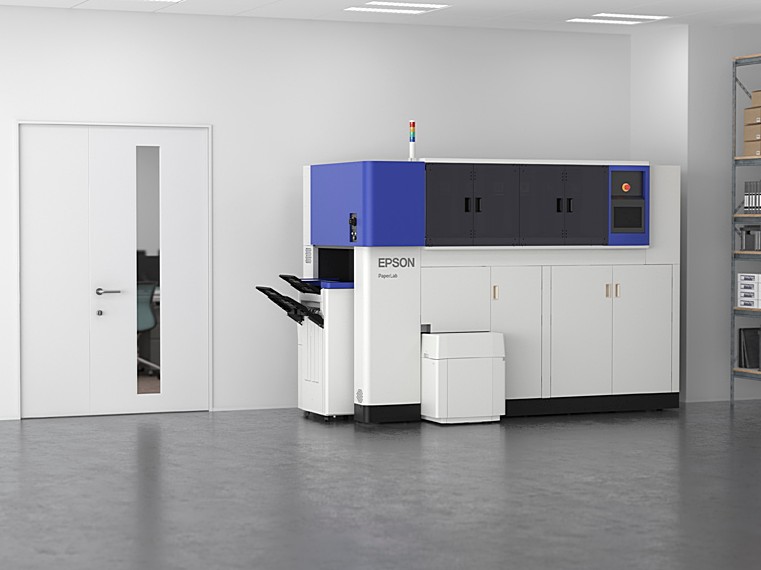
Mesin Kitar Semula Kertas / Epson The PaperLab

Mesin Kertas Pertama Recycling Epson Kemunculan sulung Dunia Untuk Pejabat Anda

The PaperLab bertukar sampah menjadi kepingan baru yang segar. Daripada menghantar jauh berjuta-juta laman yang akan disusun semula di suatu tempat, ia boleh membolehkan organisasi untuk melakukan segala-galanya di lokasi. Dipanggil PaperLab, mesin datang dari gergasi pencetak, Seiko Epson. Epson berkata ia boleh menghasilkan kertas baru dalam masa tiga minit, 14 lembaran baru satu minit, dan 6720 helaian dalam masa satu hari bekerja lapan jam.

Monday, January 4, 2016

Jadi Pengasuh

Hari Ke-2 

Dah masuk hari kedua aku menjaga irfan namun aku tak rasa kesusahan; walaupun aku dengan dia tapi aku rasa macam rapat sangat hubungan dengan anak aku yang sulung ni. Macam biasalah waktu pagi tunggu ipan ni bangun,

Thursday, December 17, 2015

Program Affiliates / Affiliates Program

Assalamualaikum,


Di sini saya ingin berkongsi dengan pembaca di sana, anda semua pernah dengar tak perkataan "affiliates" ? Apa itu affiliates? dan apakah fungsi nya?

Klikjer affiliates yang di janakan oleh orang Malaysia sendiri, serupa sistem affiliates google iaitu AdSense, di Malaysia juga tidak ketinggalan; affiliates yang di maksudkan adalah seperti NuffNang dan Ashadee . Klikjer merupakan affiliates yang terbaru dan di cadangkan oleh rakan sekerja saya untuk mencuba nya, namun tiada gunanya sekiranya ia tidak di kongsi. Di sini ada beberapa "screenshot" untuk anda semua menilai sebelum anda mendaftar.


KlikJer

KlikJer


Di maklumkan di sini, bahawa sistem affiliates ini adalah bergantung pada pembaca anda! bermakna anda harus mencari pembaca maya anda, jika affiliates ini terbiar maka untung ataupun sebarang komisyen tidak akan dikira. Oleh itu, apa tunggu lagi? Saya sudahpun daftar, anda bila lagi?


Monday, December 14, 2015

Selamat Tahun Baru 2015

Assalamualaikum


Kepada semua penduduk 360 se-Malaysia amnya, saya (Syam "Shinchan" Chumil) ingin mengucapkan Selamat Menyambut Maulidur Rasullullah S.A.W dan Selamat Menyambut Tahun Baru 2016. Kepada yang mengenali diri saya; saya bersyukur akan kehadrat illahi dengan kurnianNya maka hubungan kita semoga dapat di kukuhkan dengan ukhwah dan agar sentiasa kekal abadi selamanya In Shaa Allah. Amin Ya Rabbal Alamin.

Mohon kepada pembaca di luar sana yang mungkin bukan penduduk Kampung 360, kami turut berterima kasih kepada anda kerana anda menyokong kami selama ini dan tanpa anda semua kami tidak dapat meneruskan perjuangan selama ini. Terima kasih.

Bagi penduduk Kampung 360, di harap pada tahun hadapan 2016 semoga kita dapat memeriahkan lagi kampung 360 ini dengan lebih banyak aktiviti mahupun makan-makan (i know right!). Jadi untuk tidak membuang masa dengan ini saya mengakhiri ucapan saya wabilahitaufikwalhidayah assalamualaikum.


Friday, November 27, 2015

The best Star Wars games on PC

The best Star Wars games on PC

What are the best Star Wars games for PC? There are plenty to choose from, and the quality is wildly variable. Thankfully - in large part to sheer weight of numbers - Star Wars has probably generated more great licensed games than any other film series. And with new movie The Force Awakens appearing in cinemas imminently, and Star Wars Battlefront nearly upon us, it doesn't look like the well will be drying up any time soon.
In the mood for a more generic brand of intergalactic adventure? Check out our rundown of the best space games on PC.
In the meantime, let’s take a look at ones you can play right now. And if you don’t spot one of your favourites, hit the comments and let us know.

Star Wars: The Old Republic 

Star Wars: The Old Republic has always had a bit of an identity problem. One half of it tries to be a continuation of the Knights of the Old Republic single-player games, split up into several class stories that let you experience the Star Wars galaxy as a Chiss Imperial Agent or a Sith Warrior. The other half is the MMO half, and is pretty traditional. 
Those class stories, though, they’re worth going through the MMO stuff for. They’re ambitious, authentically Star Wars and often epic in scope, leading to things like joining the Sith Council. The latest expansion, Knights of the Fallen Empire, puts the focus almost entirely on this part of the game. 
Knights of the Fallen Empire is, essentially, a single-player game stuck inside an MMO. And it’s great, evocative of Knights of the Old Republic II even. It’s strange, the way that it tries to very hard not to be an MMO, but as the closest thing we have to a KotOR sequel, it really should be played.

Wednesday, November 4, 2015

Adobe Illustrator tutorial

Adobe Illustrator tutorial: Create repeating patterns for skate deck art

Intro

Skate decks are a mini art canvas on wheels – and some of the hottest designers around have honed their talents in pursuit of the status of design legend in the half-pipe circuit. Yet creating deck art is more than recreating yet another urban art scene and slapping it onto a strip of maple. This speedy canvas should be home to more imaginative renderings,.
This masterclass shows you how to use repeating, tiled patterns based on vector workings of real-world objects. By taking the everyday, such as vegetables and kitchen utensils in this case, and reworking them as stylized vector art, you can add a real twist and create some thought-provoking art.
After designing the objects, next comes the part that, while requiring patience, is like working with a digital jigsaw puzzle. Thanks to some clever tiling techniques and tricks, you be able to turn a few vector objects into a multi-layered, highly complex design that will have some people scratching their heads.
Some advice – stick to bright, contrasting colour palettes for maximum impact, and ensure that objects are a mix of short and long – adding pace to the composition.
Once done, head to your nearest skate emporium and prepare to dazzle with your astounding deck.