Daisypath Anniversary tickers

Sunday, October 16, 2016

Hi Awak

Macam ni lah kalau nama pun kerja kan? so semalam dan kelmarin ingat nak taip sesuatu di blog tapi tak jadi sebab sibuk dengan hal sendiri. Biasalah bila dah berkahwin ni tak banyak aktiviti yang merangsang minda dan fizikal tapi tetap ada untuk diri sendiri biar pun lambat, yelah asalkan kita bahagia kan.
Sekarang ni nak citer pasal pekerjaan sekarang, so aku faham mungkin tak berapa sesuai di jadikan topik tapi aku nak citer gak sebab ni kan blog aku nyehnyehnyeh. Mengikut pengalaman aku sekarang ni aku dah tak buat kerja grafik mahupun fotografi yang aku idam2 kan selama ini, termasuklah multimedia dan animasi serta kerja2 seni yang lain. Aku rindu sangat nak buat natam tu tapi yelah takde rezeki kot? aku cuba buat pada masa lapang tapi macam di atas lah kan memang tak sempat nak membuat dan meratah lagi la tak dan.

Selingan Video daripada Youtube


Sekarang ni aku berkait rapat dengan bisnes sawit dan perihal korporat di salah sebuah organisasi terkenal di kuantan. Aku tak bangga tapi aku bersyukur sebab ada kerja, Alhamdulillah. Pejam celik pejam celik dah masuk 7 tahun aku bekerja di sini, mana tak nya kerja yang banyak kan? start daripada aku berhenti kompeni hungka tu aku terus masuk ke sini. Kira aku start tu time aku baru kahwin dengan orang rumah aku tahun 2009. Merentas masa, melawan arus serta pelbagai lagi dugaan yang baru terpaksa la aku redahi eceh hahahahah, hanya rodong (kawan) aku sahaja yang faham berapa tahun aku dah menganggur, memang cemerlang gak lah buah anggur tu hahahahaha.

Oklah sekarang pun aku dah anak dua dan makin membesar dah diorang ni, pastu aku yang rasa perkara yang best ialah aku jumpa balik kawan sekolah vokay 1996 dulu. Cumanya takat ni aku jumpa baru lah 4 orang kira on dan off lah jumpa diorang kat kuantan. Memang kelakar bila beborak pasal cerita lama2 kat sekolah dulu, especially teringat sejarah kantoi tak solat subuh hahahaha tu biasa eh yeke? alamak kantoi hahahaha takpelah tu dulu time2 jahil kan.

Apa lagi ek aku nak cerita nantilah aku cerita pasal sekolah vokay yang femes. So sekarang aku ada keje nak sambung. 


Friday, October 14, 2016

Blog Bersawang

Assalamualaikum


Lama sungguh tak berblog rasanya, ada dekat setahun pun rasanya. Walaubagaimanapun, bila masuk balik blog ni rasa macam nak aktif semula lah rasanya. Tapi masalah nya tak tahu sampai bila dan bagaimana nak kekalkan aktif tu?

Yelah sekarang ni kan dah zaman teknologi canggih semuanya pakai apps je, yang blog ni apa lah kurang nya kan? nak kata ketinggalan zaman tak juga. Sebab apa blog ni bukan saja nak jana pendapatan tapi boleh juga di kaitkan sempadan ilmu tanpa batasan. Sebab apa saya cakap macam tu? sebab internet tiada sekatan (bagi saya) kerana jika ada sekatan bermakna ilmu itu bukanlah di kongsi atau di pelajari oleh sesiapa.

Ilmu tidak datang daripada buku sahaja tapi macam2 medium dah sekarang ni. Kalau tanya budak2 sekolah kompem korang tak sangka ada bende macam tu kan. Takpelah berbalik pada aktif pada blog tu, in shaa Allah ada masa aku akan karang kaw2 kasi baek2 punya; dan aku tahu ramai lagi yang follow aku nye blog tak kisah lah orang lama ke baru tapi at least kirim komen lah sikit takpun tekan follower tu baru sedap sikit aku tengok "oooh ada orang lagi minat kat aku ni, eh maksud saya membaca blog saya ni". Lebih kurang lah kan.

So rasa macam lapar lak ermm nak gi makan lah. Tengoklah kalau rajin kang saya buat balik / sambung balik menaip blog dah usang ni hehehehehee.

http://coschedule.com/blog/wp-content/uploads/old-blog-posts.png

Wednesday, August 24, 2016

Tips Panduan Membeli DSLR

Di sini bukan aku punya kandungan dan aku hanya berperanan untuk mengatakan penulis ini ada teori yang tersendiri. Dan bukan juga aku nak menokok tambah segala apa yang penulis cerita namun si penulis pandai di dalam pemilihan itulah yang paling penting. 
Untuk keterangan lanjut boleh melayari blog penulis ini

Monday, June 27, 2016


As ever there are a few other considerations for using a Range Extender, such as placement. The ideal solution is to position the extender approximately in the middle of your routers existing WiFi coverage rather than at the edge, since otherwise you’ll risk boosting an already poor signal and the performance will suffer.

Equally it’s important to make sure that the extender supports the same WiFi spec (e.g. 802.11n, 802.11ac) as your router and likewise try to pick one that supports both the 2.4GHz and 5GHz bands, assuming your router supports both of those (most modern ones do). Just remember that the extended signal will always perform a little worse than the original, which is largely unavoidable but not a huge concern.


Source(s)

Use Encryption

As a general rule everybody should have security / encryption enabled on their home WiFi routers (ideally the WPA2 setting), but some people leave it disabled out of a belief that doing so will improve their network performance. In reality this was only really an issue for the very early WiFi hardware with WEP encryption enabled (this is very easy to hack and should generally never be used) or budget routers with first generation WPA (TKIP) enabled, which struggled to handle the extra overhead.

By comparison the impact of enabling WPA2 on modern hardware, even many cheaper devices, is negligible. Indeed I’ve found that using encryption can actually make the connection more stable and less likely to drop connectivity at the edges of coverage. But I must admit to not being entirely sure why that is (it could just be a quirk of the hardware I’ve used).

Pro Tip: Try to ensure that all of your WiFi kit is using and supports the WPA2 (AES) Advanced Encryption Standard. Some settings, such as WPA2-TKIP/AES, might seem stronger for security but they actually only exist for backwards compatibility (less secure) with older devices and it’s not necessary to use that dual setting unless you have older kit in your network (enabling it may also carry a greater performance detriment).

Advanced Tweaks

Some routers give the end-user significantly more flexibility to play with the advanced settings of their WiFi, such as by adjusting the options for Beacon Interval, Fragmentation Threshold, RTS Threshold or various other things. Generally speaking you should leave these well alone as most adjustments will often sacrifice something in one area in order to improve it in another and if you get this balance wrong then problems can occur. But if you do want to try then here are a few quick suggestions.

Beacon Interval (milliseconds)

WiFi routers use these “beacon” signals to help keep the network synchronized and many default to 100ms. Setting a lower (e.g. 50 or 75ms) interval might help your WiFi network to hold its connection with other devices, albeit at a cost to some battery life on other devices. By contrast raising the setting above 100ms could save power but the likelihood of connectivity problems may increase.

RTS Threshold (Request To Send)

The RTS Threshold protocol is a tricky one to explain, but it helps to clear the channel before data is sent. A lower setting may help in busy WiFi environments as it should reduce collisions, but set it too low or incorrectly and your network performance may suffer. It’s a tricky balancing act to get right.

Fragmentation Threshold

Any data packets larger than the size programmed in this field will be fragmented. Setting smaller packets than the default can improve reliability, especially in busy environments, albeit at the cost of performance. Again, we wouldn’t touch this or the RTS threshold unless you’re comfortable with making such tweaks and always make a note of your settings so you can swap them back if it doesn’t work.

Hopefully some of these tips will prove useful to you or at least provide some additional background on how WiFi works. Just remember that WiFi is far from perfect and wired connections will generally always deliver faster speeds with lower latency and more stability.

Sunday, January 31, 2016

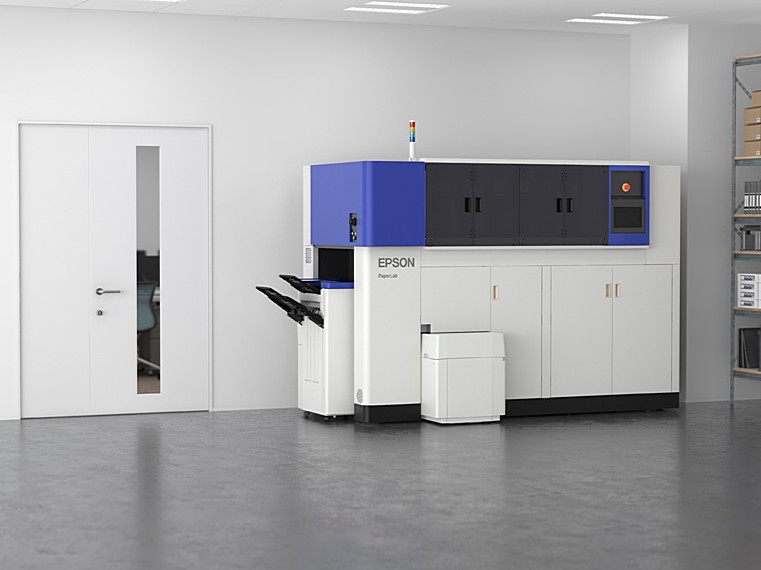
Mesin Kitar Semula Kertas / Epson The PaperLab

Mesin Kertas Pertama Recycling Epson Kemunculan sulung Dunia Untuk Pejabat Anda

The PaperLab bertukar sampah menjadi kepingan baru yang segar. Daripada menghantar jauh berjuta-juta laman yang akan disusun semula di suatu tempat, ia boleh membolehkan organisasi untuk melakukan segala-galanya di lokasi. Dipanggil PaperLab, mesin datang dari gergasi pencetak, Seiko Epson. Epson berkata ia boleh menghasilkan kertas baru dalam masa tiga minit, 14 lembaran baru satu minit, dan 6720 helaian dalam masa satu hari bekerja lapan jam.

Monday, January 4, 2016

Jadi Pengasuh

Hari Ke-2 

Dah masuk hari kedua aku menjaga irfan namun aku tak rasa kesusahan; walaupun aku dengan dia tapi aku rasa macam rapat sangat hubungan dengan anak aku yang sulung ni. Macam biasalah waktu pagi tunggu ipan ni bangun,

Thursday, December 17, 2015

Program Affiliates / Affiliates Program

Assalamualaikum,


Di sini saya ingin berkongsi dengan pembaca di sana, anda semua pernah dengar tak perkataan "affiliates" ? Apa itu affiliates? dan apakah fungsi nya?

Klikjer affiliates yang di janakan oleh orang Malaysia sendiri, serupa sistem affiliates google iaitu AdSense, di Malaysia juga tidak ketinggalan; affiliates yang di maksudkan adalah seperti NuffNang dan Ashadee . Klikjer merupakan affiliates yang terbaru dan di cadangkan oleh rakan sekerja saya untuk mencuba nya, namun tiada gunanya sekiranya ia tidak di kongsi. Di sini ada beberapa "screenshot" untuk anda semua menilai sebelum anda mendaftar.


KlikJer

KlikJer


Di maklumkan di sini, bahawa sistem affiliates ini adalah bergantung pada pembaca anda! bermakna anda harus mencari pembaca maya anda, jika affiliates ini terbiar maka untung ataupun sebarang komisyen tidak akan dikira. Oleh itu, apa tunggu lagi? Saya sudahpun daftar, anda bila lagi?


Monday, December 14, 2015

Selamat Tahun Baru 2015

Assalamualaikum


Kepada semua penduduk 360 se-Malaysia amnya, saya (Syam "Shinchan" Chumil) ingin mengucapkan Selamat Menyambut Maulidur Rasullullah S.A.W dan Selamat Menyambut Tahun Baru 2016. Kepada yang mengenali diri saya; saya bersyukur akan kehadrat illahi dengan kurnianNya maka hubungan kita semoga dapat di kukuhkan dengan ukhwah dan agar sentiasa kekal abadi selamanya In Shaa Allah. Amin Ya Rabbal Alamin.

Mohon kepada pembaca di luar sana yang mungkin bukan penduduk Kampung 360, kami turut berterima kasih kepada anda kerana anda menyokong kami selama ini dan tanpa anda semua kami tidak dapat meneruskan perjuangan selama ini. Terima kasih.

Bagi penduduk Kampung 360, di harap pada tahun hadapan 2016 semoga kita dapat memeriahkan lagi kampung 360 ini dengan lebih banyak aktiviti mahupun makan-makan (i know right!). Jadi untuk tidak membuang masa dengan ini saya mengakhiri ucapan saya wabilahitaufikwalhidayah assalamualaikum.


Friday, November 27, 2015

The best Star Wars games on PC

The best Star Wars games on PC

What are the best Star Wars games for PC? There are plenty to choose from, and the quality is wildly variable. Thankfully - in large part to sheer weight of numbers - Star Wars has probably generated more great licensed games than any other film series. And with new movie The Force Awakens appearing in cinemas imminently, and Star Wars Battlefront nearly upon us, it doesn't look like the well will be drying up any time soon.
In the mood for a more generic brand of intergalactic adventure? Check out our rundown of the best space games on PC.
In the meantime, let’s take a look at ones you can play right now. And if you don’t spot one of your favourites, hit the comments and let us know.

Star Wars: The Old Republic 

Star Wars: The Old Republic has always had a bit of an identity problem. One half of it tries to be a continuation of the Knights of the Old Republic single-player games, split up into several class stories that let you experience the Star Wars galaxy as a Chiss Imperial Agent or a Sith Warrior. The other half is the MMO half, and is pretty traditional. 
Those class stories, though, they’re worth going through the MMO stuff for. They’re ambitious, authentically Star Wars and often epic in scope, leading to things like joining the Sith Council. The latest expansion, Knights of the Fallen Empire, puts the focus almost entirely on this part of the game. 
Knights of the Fallen Empire is, essentially, a single-player game stuck inside an MMO. And it’s great, evocative of Knights of the Old Republic II even. It’s strange, the way that it tries to very hard not to be an MMO, but as the closest thing we have to a KotOR sequel, it really should be played.

Wednesday, November 4, 2015

Adobe Illustrator tutorial

Adobe Illustrator tutorial: Create repeating patterns for skate deck art

Intro

Skate decks are a mini art canvas on wheels – and some of the hottest designers around have honed their talents in pursuit of the status of design legend in the half-pipe circuit. Yet creating deck art is more than recreating yet another urban art scene and slapping it onto a strip of maple. This speedy canvas should be home to more imaginative renderings,.
This masterclass shows you how to use repeating, tiled patterns based on vector workings of real-world objects. By taking the everyday, such as vegetables and kitchen utensils in this case, and reworking them as stylized vector art, you can add a real twist and create some thought-provoking art.
After designing the objects, next comes the part that, while requiring patience, is like working with a digital jigsaw puzzle. Thanks to some clever tiling techniques and tricks, you be able to turn a few vector objects into a multi-layered, highly complex design that will have some people scratching their heads.
Some advice – stick to bright, contrasting colour palettes for maximum impact, and ensure that objects are a mix of short and long – adding pace to the composition.
Once done, head to your nearest skate emporium and prepare to dazzle with your astounding deck.

Friday, October 30, 2015

Know Your Camera

COMPACT VS. DIGITAL SLR CAMERAS

Choosing between a compact (or "point and shoot") and a digital SLR camera is often the first big purchasing decision when starting out with photography. Not only is it potentially a big financial decision, but it may also determine what kinds of shots you'll be capable of capturing. This tutorial cuts through all the marketing hype in order to highlight only the most important differences between each camera type — thereby helping you to decide which one is best for you and your shooting style.
What exactly does it mean for a camera to be a compact (or point and shoot) versus an SLR? Strictly speaking, SLR cameras just have viewfinders that see the same light as the camera's sensor (more on this later), but in practice this isn't the only distinction. While the line between each continues to blur, these three differences usually* still apply:

 OVERVIEW
  1. Viewfinder Mechanism
  2. Fixed vs. Interchangeable Lenses
  3. Camera Sensor Size
There's also a range of more minor differences (which vary depending on the camera brand or model), the above three are often what most impact one's photography. The next several sections will focus on what these three differences actually mean in practice, and how your photography style will be impacted. At the end, we'll also discuss some of the other more minor differences between the two camera types.
*Notable Exceptions: The "Micro Four Thirds" or 4/3 standard has interchangeable lenses, but doesn't use the standard SLR viewfinder mechanism (Olympus/Panasonic cameras). Some budget SLR cameras may also have fixed lenses, and some high-end compact style cameras can have sensors that are nearly as large as an SLR — but each is the exception rather than the rule.
However, this deserves mentioning up-front: SLR cameras are usually MUCH more expensive than compact cameras — mostly as a consequence of the above three differences (we'll discuss why later). Also, unlike with compact cameras, purchasing an SLR camera is only part of the cost; you may have to buy additional lenses, an external flash and other accessories. These can even end up costing more than the camera itself.

1. VIEWFINDER MECHANISM

Unlike compact cameras, with an SLR camera what you're seeing through the viewfinder is the same light that will reach your camera's sensor when you press the shutter button:
compact camera viewfinder
Compact Camera
SLR camera viewfinder
SLR Camera:Mirror DownMirror Up
With an SLR, when you press the shutter button, the mirror flips up and the light that was formerly being re-routed to your eye instead gets sent straight to the camera sensor. Move your mouse over the buttons above to see how this works. The flipping up of the mirror is also what makes the characteristic clicking or snapping sound that we've come to associate with SLR cameras.
With a compact camera, the viewfinder mechanism instead just tries to estimate what light will reach the sensor, so it's potentially less accurate. Compact cameras may also use what's called an electronic viewfinder (EVF), which attempts to re-create what an SLR viewfinder would see — but by instead using the electronic image from the sensor.
Note: The above behavior is in fact why they're called "Single Lens Reflex" (SLR) cameras — because the same lens is used to produce the image in the viewfinder as is used to capture that image at the sensor, and the mirror reflects light to the viewfinder ("reflex" referred to the reflection in German). However, this terminology can be a little confusing, because SLR cameras are the type of camera that can use more than just a "single lens" — not compact cameras.
The need for a prism/mirror is one of the reasons why SLR cameras cost more (other than sensor size), and can make a big difference for a camera designer/manufacturer. However, in practice the sensor size and ability to change lenses will likely make more of a difference to your photography. This is especially true since many camera owners choose to use the rear LCD screen instead of the viewfinder.
On the other hand, if your work requires seeing exactly the light that will be captured, then you should certainly opt for an SLR. Otherwise, you can usually still see exactly how that light will be captured using either a compact or an SLR camera — by looking at the rear LCD in "live view" mode, and by using a live histogram.

2. FIXED vs. INTERCHANGEABLE LENSES

The fact that SLR cameras can change out their lenses is likely the first difference that one notices, or knows ahead of time. Yes, many compact cameras can use lens adaptors (especially the high-end variety), but the original lens still remains on the camera.
pentaprism in SLR camera
photo courtesy of scott bourne
Why would a camera need more than one lens? It is difficult if not impossible to design a single lens that can capture scenes using the wide range of styles commonly used by photographers — all without noticeably sacrificing quality and portability. Each style is therefore far better suited by a single, special purpose lens.
In practice, being able to use different lenses usually means that:
  • You'll be able to use wider lens apertures (lower f/stops), which will enable a shallowerdepth of field and/or better low-light performance.
  • You'll be able to use specialized lenses, such as ultra-wide angle lenses, fish-eye lenses and extreme telephoto lenses, which will give you more creative options.
  • You'll have the potential to achieve better image quality, primarily because your lens will likely have been more specifically designed for the task at hand.
For example, with portraits one could use a wide aperture (such as f/2.0 or less) in order to create a smooth out of focus background and isolate their subject. Alternatively, with architecture one could use an ultra-wide angle lens that's been designed to also minimize distortion (causing otherwise straight lines to appear curved). Neither of these scenarios would be possible with the vast majority of compact cameras.
ultra-wide angle example
shallow depth of field example
photo on left courtesy of eliya
However, using more than one lens also means that:
  • You need to carry more lenses with you if you plan on shooting a range of different styles and subjects. This decreases the portability of your camera system.
  • You need to change lenses every time you wish to change shooting styles. This can interrupt your shooting rhythm.
  • You might introduce dust onto your camera's sensor each time you have to change lenses. This can reduce image quality and be difficult to remove. See the tutorial on camera sensor cleaning for more on this topic.
Of course, to negate any potential inconvenience, you could always choose your favorite all-around lens for your SLR and just stick with that. In addition, the built-in lens on a high-end compact camera can sometimes produce higher quality images than a stock or budget SLR lens, and is often also a lot more versatile. However, once you start spending a lot more, compact camera lenses rarely hold their own against high-end SLR lenses.

3. CAMERA SENSOR SIZE

In general, compact cameras have much smaller camera sensors than SLR cameras. This is a less commonly known "under the hood" difference between SLR and compact cameras, but is likely one that will make the most noticeable impact on image quality.
typical size of compact camera photosites
typical size of SLR camera photosites
What does this mean in practice?
  • Cost. Larger sensors are much more expensive to make, and usually require correspondingly more expensive lenses. This is the biggest reason why SLR cameras cost so much more than compact cameras.
  • Weight & Size. Larger sensors require much heavier and larger camera lenses and camera bodies, because the lens needs to capture and project light over a larger sensor area. Other than reducing portability, this can also be a disadvantage because it makes one look more conspicuous with their large SLR camera/lens (thereby making candid people shots more difficult).
  • Depth of Field. Larger sensors create a shallower depth of field at the same aperture setting. For example, a lens at f/4.0 on a compact camera likely won't create a blurred background in a portrait, whereas f/4.0 on an SLR camera will likely create a smooth, creamy background (depending on subject distance). This can be an advantage for portraits, but a disadvantage for landscapes.
  • Image Noise. For the same number of megapixels, larger sensors have much larger photosites/pixels* (as shown above). This increased light-gathering area means that these pixels will be more sensitive to tiny amounts of light — resulting in less image noise. This means that an SLR camera can usually get away with a much higher ISO setting than a compact camera without appearing noisier.
  • Dynamic Range. Another consequence of having physically larger pixels is that SLR cameras can usually capture a greater range of light to dark without having this become solid white or black, respectively (a higher "dynamic range"). This reduces the chance of blown highlights in the sky or other bright objects, and can preserve more details in the deep shadows.
*Technical Note: strictly speaking, a photosite isn't the same as a pixel, since a pixel is usually created based on several photosites, but we'll use the more familiar word "pixel" here even though we really mean "photosite." See the tutorial on digital camera sensors for more on this.
example of a photo with a large dynamic range
example of a photo using a high ISO speed to freeze action
photo on right courtesy of coltfan909
The key here is that a different sensor size is just a trade-off; one size isn't necessarily all-around better than another, so you need to consider how the pros/cons of each will fit into your intended shooting style. For much more on this topic, also see the tutorial on digital camera sensor sizes.

OTHER COMMON DIFFERENCES

In addition to what's already been discussed, each camera type may also have other advantages, depending on the specific brand or model. These include:
Compact Camera Advantages
  • Live view rear LCD (although most newer SLR's have this feature)
  • Greater range of pre-programmed creative modes
  • No mirror/shutter mechanism that can fail after ~10-100K shots
SLR Camera Advantages
  • Faster camera autofocus
  • Much less shutter lag (delay between pressing the shutter and starting the exposure)
  • Higher maximum frame rate
  • RAW file format support (although most high-end compact cameras have this)
  • Ability to take exposures longer than 15-30 seconds (using manual or bulb mode)
  • Offers complete manual exposure control
  • Ability to use an external flash unit (but many high-end compact cameras have this)
  • Manual zoom control (by twisting the lens as opposed to using an electronic button)
  • Greater range of ISO speed settings
  • Ability to upgrade just the camera body and keep all of one's lenses
However, many of the above differences follow from the fact that one often spends a lot more on an SLR than a compact camera, and aren't necessarily inherent to each type. If one spends enough on a prosumer/high-end compact camera, they can often attain many of the above features typically found with SLR cameras.

SUMMARY: COMPACT vs. DIGITAL SLR

The preference between each camera type really comes down to one of (a) flexibility and the potential for higher image quality versus (b) portability and simplicity. This choice often isn't a matter of which is right for a given person, but which is better for a given shooting environment and intended photo use.
Compact cameras are much smaller, lighter, less expensive and less conspicuous, but SLR cameras allow for a shallower depth of field, a greater range of subject styles and the potential for higher image quality. Compact cameras are probably better for learning photography, since they cost less, simplify the shooting process and are a good all-around option for capturing many types of scenes out of the box. SLR cameras are much better suited to specific applications, and when size and weight aren't important.
Costs aside, many prefer to own both types of cameras. That way they can take their compact camera to parties and long hikes, but have an SLR available when they need to capture indoor subjects in low-light, or when they're going somewhere specifically for photography (such as for landscapes or events).

Tuesday, August 25, 2015

Adobe Illustrator tutorial: Design retro isometric artwork [copy&paste]

Vector illustration can produce beautifully clean, precise artwork, but the results can also be a bit soulless. Here Mark Oliver creates those clean, precise shapes and then ‘grubbies’ them up for a more organic retro look.

Intro

Vector illustration can produce beautifully clean, precise artwork, but the results can also be a bit soulless. Here Mark Oliver creates those clean, precise shapes and then ‘grubbies’ them up for a more organic retro look. He also gives you a recipe for transforming shapes to fit a predefined isometric projection without having to do any calculations.
You can modify this tutorial to work on an illustration of your own as long as it conforms with the projection used. Import a 150dpi greyscale scan of your drawing and then follow the steps outlined below.

Time to Complete

3 - 4 hours

Software

Illustrator